

Who is this for?
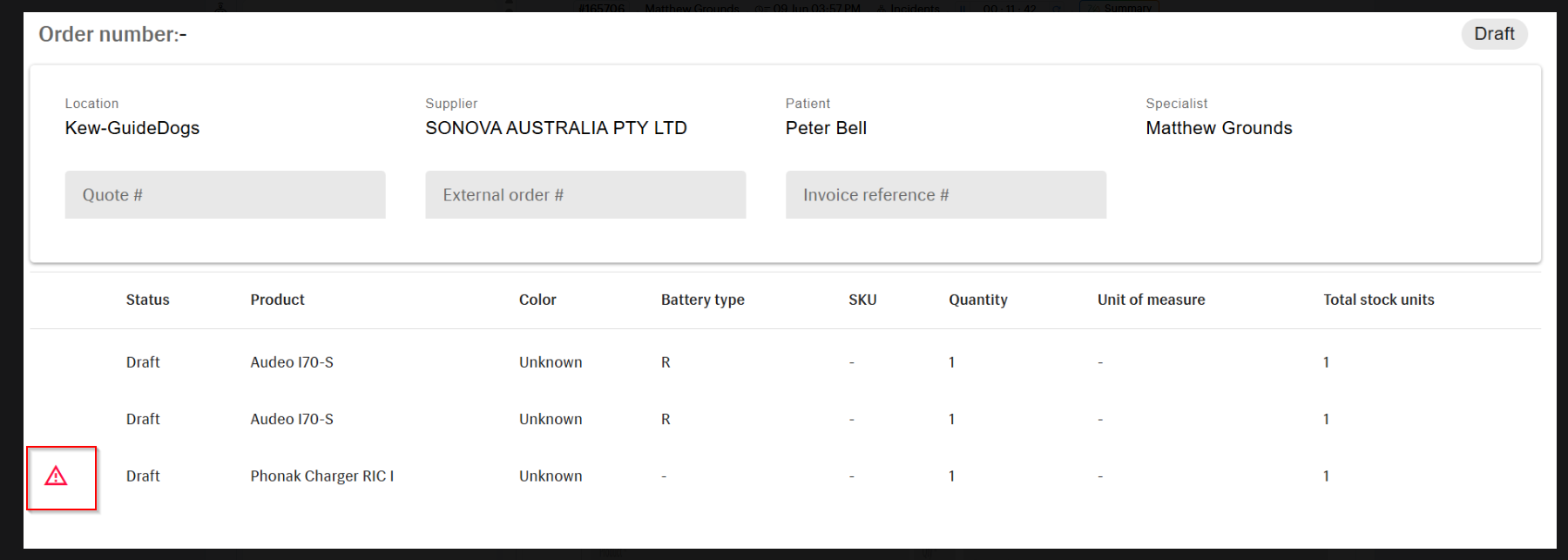
This guide is for anyone placing or submitting stock orders in Manage who sees an error on a specific line item in a draft order, even though the item's details (colour, quantity) look correct.
Before you start
You'll need:
- Access to Inventory > Product Catalog in Manage
- The exact product name shown on the order line with the error (for example, Phonak Charger RIC I)
Steps
Step 1: Identify the affected product
Note the exact name of the product showing the error on your draft order.
📸 Screenshot: The draft order screen with a red warning icon next to the affected line item
Step 2: Open the Product Catalog
Navigate to Inventory > Product Catalog.
Step 3: Search for the product
Enter the product name (for example, Phonak Charger RIC I) in the search field.
Step 4: Open the product for editing
Click Edit on the matching product.
💡 Tip: This issue is most common on products that were migrated from an older environment, so don't worry if the product looks otherwise fully set up.
Step 5: Check the Manufacturer field
Look at the Manufacturer field on the product.
Step 6: Update or confirm the Manufacturer field
- If Manufacturer is blank, select the appropriate manufacturer from the list.
- If Manufacturer is already set to Unknown, no change is needed.
Step 7: Save the product
Click Save to apply the update (or re-save with no changes if Manufacturer was already set to Unknown).
Step 8: Retry the order
Return to your draft order and click Save/Submit again to check that the error is gone.
✅ You're done!
The error next to your product line item should now be cleared, and you should be able to save and submit the order normally.
Troubleshooting
If something didn't work:
- If the error still appears after saving the product, double-check that you clicked Save on the Product Catalog screen (not just Cancel).
- If the same error appears on other line items, repeat the same steps for each affected product.
Related articles
- How to add stock to a location in Manage
- Understanding product statuses in the Product Catalog
- How to troubleshoot draft orders that won't submit