

 Auditdata Support activates the Online Booking module, which is fully integrated with Manage. As part of the setup, they configure how appointment time slots are generated and tailor key options such as:
-
The start day of the week
-
The booking window (how far in advance patients can schedule appointments)
They also handle customization and rebranding, including applying your company’s logo and corporate color scheme.
Once Online Booking is enabled for a clinic, the Online Booking tab appears in Environment Settings.
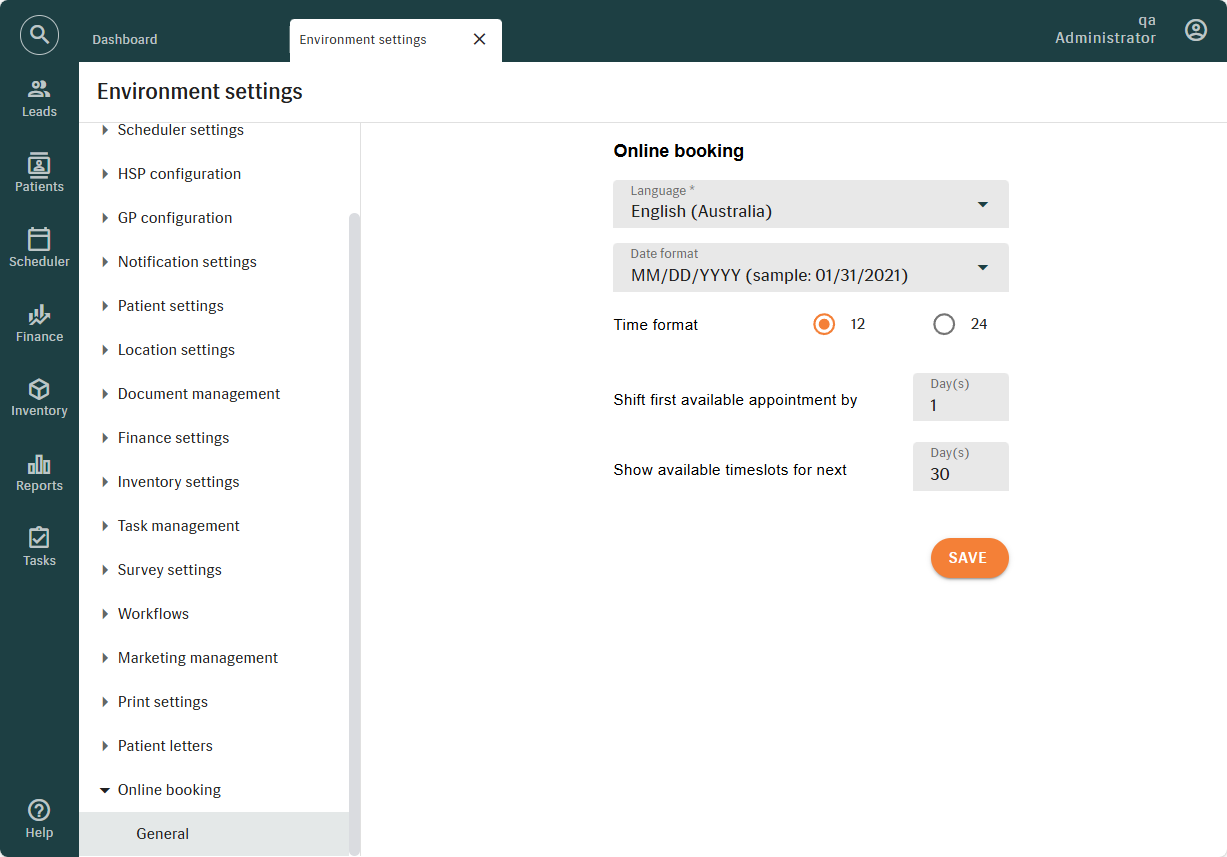
On the GENERAL TAB, you can:
-
Define a default language that will be used if a patient’s browser language is not supported.
The default language acts as a backup. If the system cannot match the patient’s browser language to one of your supported languages, Online Booking will load in the language you have selected. This setting does not change the patient’s browser language; it only determines which language Online Booking displays.
-
Set the date and time format to match regional or organizational preferences.
-
Define how soon patients can book appointments using the "Shift First Available Appointment" setting:
-
Leave the field empty to allow same-day bookings.
-
Enter a numeric value (e.g., 1 or 2) to delay availability by that number of days.
-
Specify how many days of available time slots the Online Booking Module should display using the "Show Available Timeslots" setting.
Changes apply only after clicking
SAVE.