

Quick summary
Dell Optimizer can silently auto-install the Waves MaxxAudio driver as a Windows component. Because it does not appear in Programs and Features, it must be removed manually from disk C. This guide walks you through disabling the service, searching for and deleting the driver files, taking folder ownership if needed, and reconfiguring Primus as the default audio device.
This process involves taking ownership of protected Windows folders and deleting system-level driver files. Proceed carefully. If unsure, contact Auditdata Support before continuing.
⚙️ Before you begin
- You will need administrator access to the PC throughout this process.
- Close Primus, Unity, and Measure before starting.
Step 1: Disable the Waves MaxxAudio service in Task Manager
- Right-click the Windows taskbar → select Task Manager.

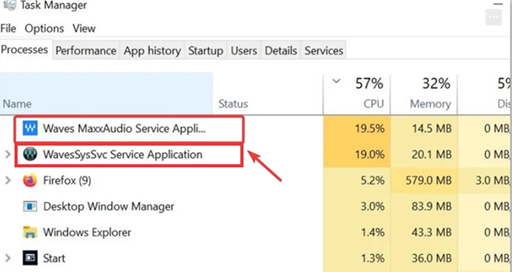
- In the Processes tab, find Waves MaxxAudio and WavesSysSvc. Right-click each → End Task.
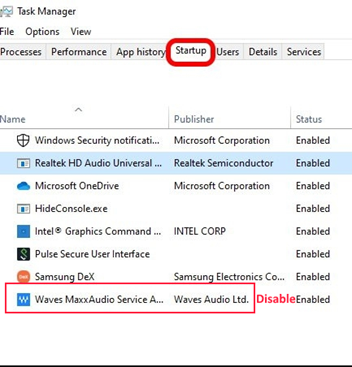
- Go to the Startup tab. Find Waves MaxxAudio, right-click → Disable.
→ Test Primus, Unity, or Measure. If sound plays correctly - skip to Step 3 to set the default device. If not - continue to Step 2 to remove the driver files.
Step 2: Find and delete the Waves MaxxAudio driver files
- Open File Explorer and navigate to This PC → Local Disk (C:).
- In the search box at the top right, search for
maxx- this finds all files and folders with "maxx" in the name. - For each result found, right-click → Open file location, then delete the entire folder containing MaxxAudio files.

If a folder cannot be deleted due to permission restrictions, continue to Step 2a to take ownership of the folder first.
Step 2a: Take ownership of a protected folder (if needed)
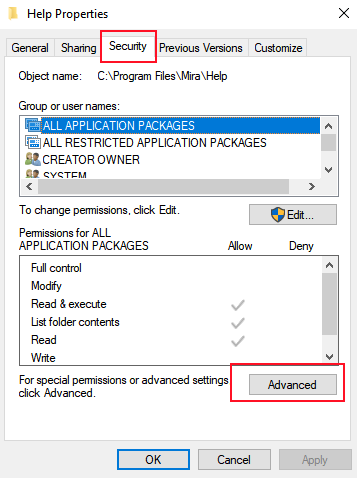
- Right-click the protected folder → Properties → Security tab → Advanced.
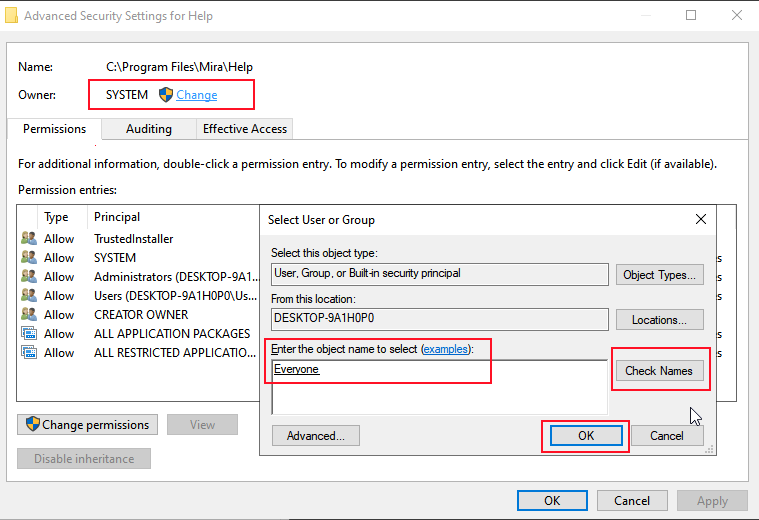
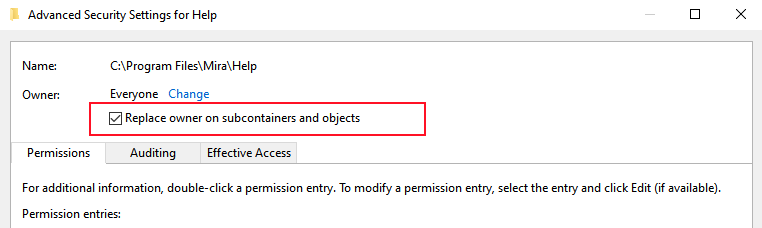
- Next to Owner, click Change. In the field, type
Everyone→ click Check Names → OK.
- Check Replace owner on subcontainers and objects → click Apply → OK.
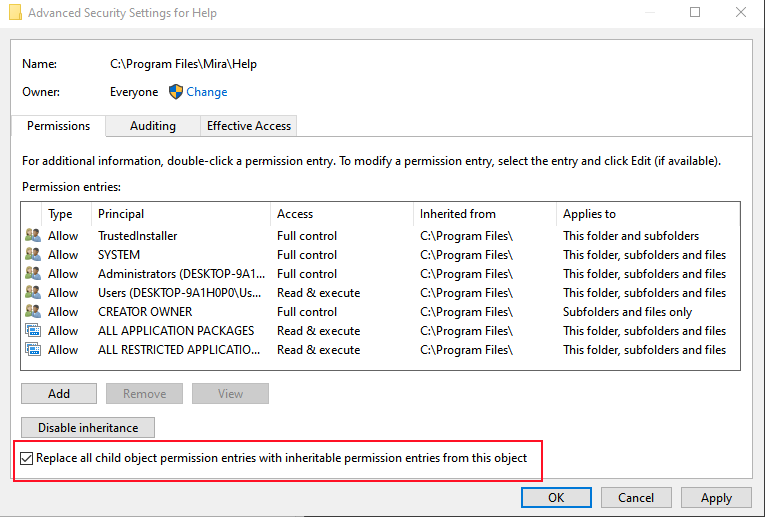
- Back in the Advanced Security Settings window, check Replace all child object permission entries with inheritable permission entries from this object → Apply → Yes → OK.
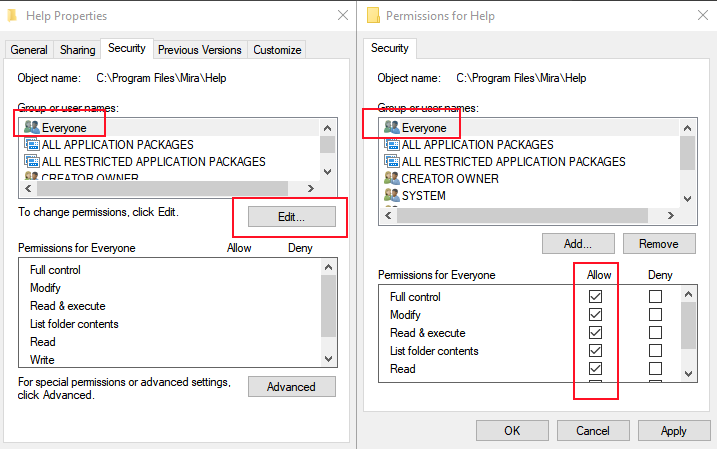
- Go back to the folder's Properties → Security tab → Edit. Select Everyone → check Allow Full Control → Apply → Yes → OK.
- Close the Properties window and delete the Waves MaxxAudio folder. Repeat Steps 2 and 2a for all remaining MaxxAudio folders found in step 2.
Step 3: Reconfigure Primus as the default audio device
- Open Control Panel → Sound.
- In the Playback tab, right-click Primus (or Unity or Measure) → Set as Default Device. Right-click again → Set as Default Communication Device.
- Double-click the Primus device to open its Properties → go to the Effects tab → select Disable all effects → click Apply.
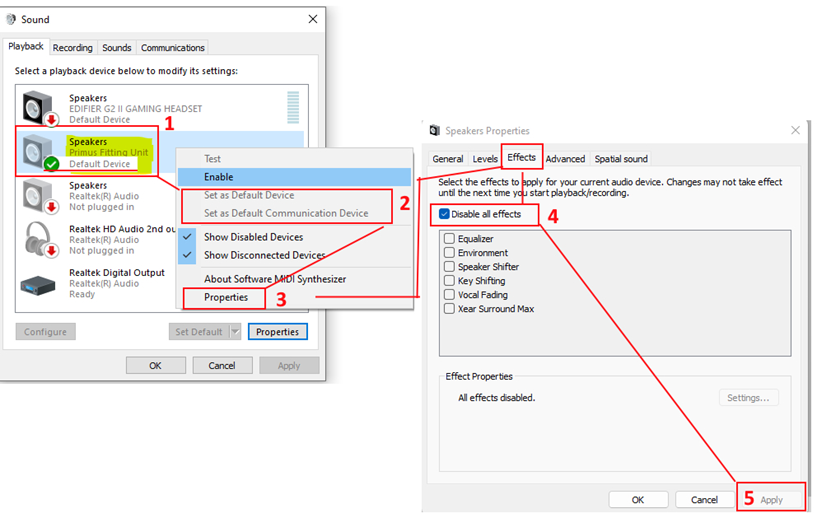
- Open Primus, Unity, or Measure and test audio playback.
🔺 Escalation path
If audio still does not play correctly after completing all steps, contact Auditdata Support.
Please have ready:
- PC model (especially whether it is a Dell)
- Primus/Unity/Measure software version
- Windows version
- Your account name and contact details
- Which steps above you already tried
- Any error messages or unusual behaviour observed
✅ Expected outcome
After completing these steps, the Waves MaxxAudio driver is fully removed, Primus/Unity/Measure is set as the default audio device with all effects disabled, and audio playback functions correctly.
📝 Additional notes
- This issue is specific to PCs where Dell Optimizer installs Waves MaxxAudio as a Windows component - it will not appear in Programs and Features.
- After Windows updates, check whether Waves MaxxAudio has been reinstalled - Dell Optimizer may re-install it automatically.
- Related articles: Second channel can be heard when stimulus Speech (echo issue) · Audio Drivers Re-installation in Windows (Speaker Soft Sound Issue)
Need more help? Visit the Auditdata Help Centre or contact our support team.
© Auditdata - 2026