

Quick summary
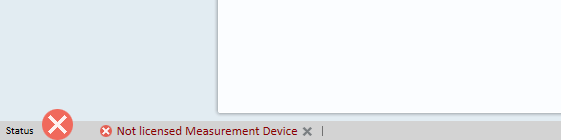
The "Not licensed Measurement Device" error appears in the lower-left corner of Measure . This usually means the hardware is detected, but the Measure device has been disabled in Windows Sound settings. Re-enabling it resolves the issue.
⚙️ Before you begin
- Make sure the Measure device is physically connected to the PC.
Step 1: Open Windows Sound settings
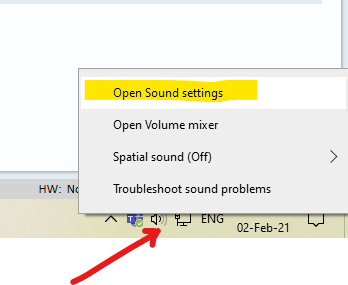
- Right-click the Sound icon in the Windows taskbar → select Open Sound Settings.
Step 2: Open Sound Control Panel
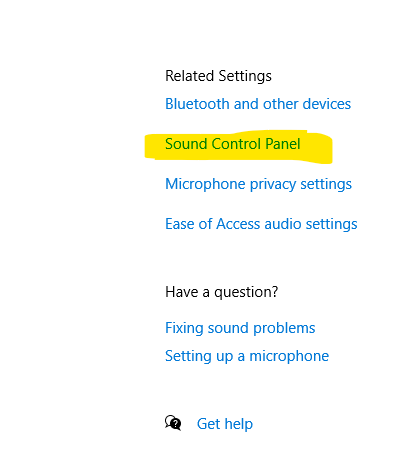
- In Sound Settings, click Sound Control Panel (on the right side, under Related Settings).
Step 3: Enable the Measure device
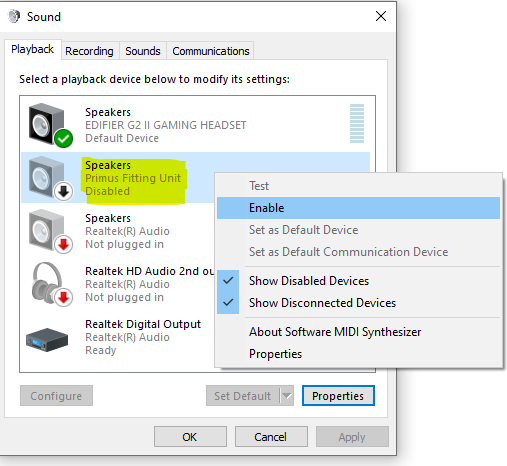
- In the Playback tab, find the Measure device in the list. If it shows as disabled (grey icon), right-click it → Enable.
- Click OK to close Sound Control Panel.
- Restart Measure and check whether the error is gone.
→ Check if the issue is resolved. If yes - you're done ✓. If no - proceed to the escalation path below.
⚠️ Special conditions
If enabling the Measure device in Sound settings does not resolve the error, the issue may be licence-related rather than a Windows configuration problem. Contact Auditdata Support for a licence check.
🔺 Escalation path
If the error persists after enabling the Measure device, contact Auditdata Support.
Please have ready:
- Measure software version
- Device model and serial number
- Your account name and contact details
- Which steps above you already tried
- Screenshot of the error and Windows Sound Control Panel
✅ Expected outcome
After enabling the Measure device in Sound Control Panel, the "Not licensed Measurement Device" error should no longer appear and Measure should function normally.
📝 Additional notes
- Windows updates can sometimes disable audio devices automatically - check Sound Control Panel after any major Windows update.
- Related articles: Error message "Measure serial number is" · Measurement software uninstall error on Windows 11 PC COM object error
Need more help? Visit the Auditdata Help Centre or contact our support team.
© Auditdata - 2026