

Quick summary
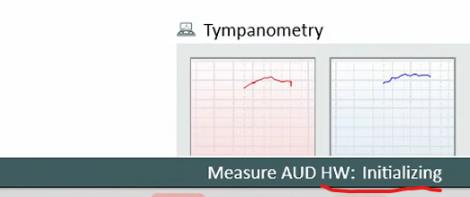
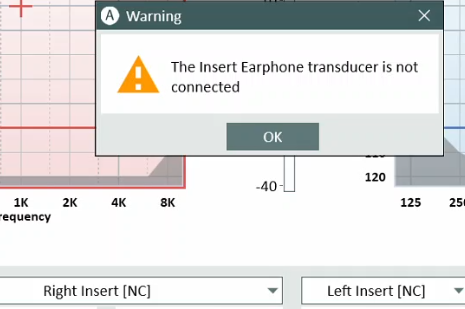
Measure sometimes shows "Insert earphone [NC]" and a "The transducer is not connected" warning when you open a Test Module too soon after launching the software, even though your earphone is connected.
⚙️ Before you begin
- Confirm your earphone or transducer is physically connected to the system
- Have the Measure software open and ready
Step 1: Did the message appear right after launching Measure?
Did you open a Test Module immediately after starting Measure, before the hardware finished initializing?
✅ Yes → Follow these steps:
- Close the Test Module if it's still open.
- Wait until the Measure AUD HW status shows "Connected".
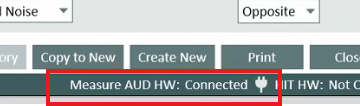
- Open the Test Module again and confirm the correct earphone or transducer is detected.
→ Check if the issue is resolved. If yes, you're done ✓. If no, continue to Step 2.
❌ No → Continue to Step 2.
Step 2: Confirm the connection and restart if needed
Is the earphone or transducer still not detected after initialization has completed?
✅ Yes → Take these steps:
- Disconnect and reconnect the earphone or transducer.
- Close and reopen the Test Module after the hardware status shows Connected.
- Restart Measure and wait for full initialization before opening any modules.
- If the issue persists, restart the workstation.
❌ No → You're done ✓.
🔺 Escalation path
If none of the above steps resolved the issue, contact Auditdata Support.
Please have ready:
- Product name and version number
- Device model and serial number (if applicable)
- Firmware version (if applicable)
- Your account name and contact details
- Which steps above you already tried
- Exact error messages or codes shown
- Screenshots if available
✅ Expected outcome
The Test Module opens with your earphone or transducer correctly detected, and the "Insert earphone [NC]" message no longer appears.
📝 Additional notes
- Always give Measure a few seconds to finish initializing before opening a Test Module.
- Related articles: Measure Software User Guide, Transducer Configuration and Setup Guide
📎 Related resources
- ac2ff44f-6996-4bd3-8a4e-6b4f892b117f.png (orphan attachment from source page, kept for reference)
🗒️ Content not mapped to template
- Source article included an internal step: "Escalate the issue to L3 or Engineering Team." Per external-article rules, internal contacts and escalation routing are excluded from customer-facing content. Noted here for visibility, not published.
Need more help? Visit the Auditdata Help Centre or contact our support team.
© Auditdata - 2026