

Quick summary
During speech stimulus testing, you hear echo effects, double words, sound bleeding into the wrong channel, or the entire word list plays continuously in stepped mode. These issues are caused by Windows audio enhancements - particularly Waves MaxxAudio - or the Mono Audio setting interfering with Measureaudio output.
⚙️ Before you begin
- Check whether Waves MaxxAudio or a similar third-party audio utility is installed on this PC.
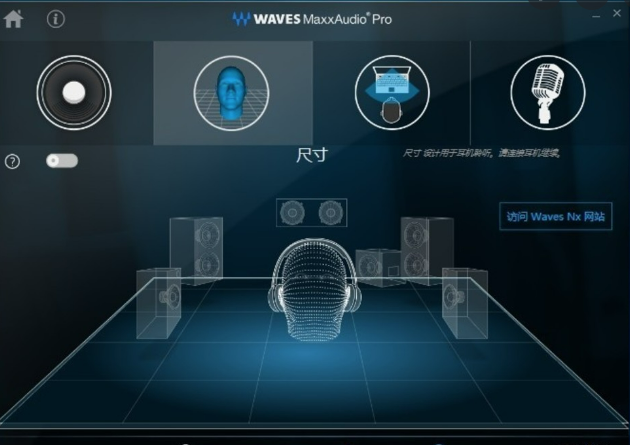
Step 1: Disable Waves MaxxAudio enhancements
Is Waves MaxxAudio installed and enabled on this PC?
- ✅ Yes → Take these steps:
- Open the Waves MaxxAudio utility.
- Disable all audio enhancement effects.
- Restart the PC to apply the changes.
→ Check if the echo or bleed is resolved. If yes - you're done ✓. If no - continue to Step 2. * ❌ No → Proceed to Step 2.
Step 2: Disable Windows audio enhancements
Are audio enhancements disabled for all output devices in Windows Sound settings?
- ✅ Yes → Proceed to Step 3.
- ❌ No → Take these steps:
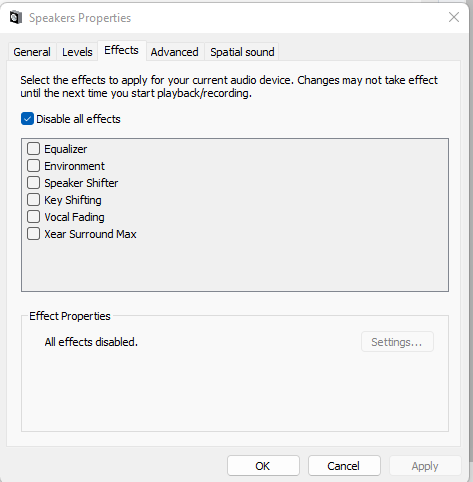
- Right-click the speaker icon in the taskbar → Open Sound settings.
- For each audio output device (internal speakers, Primus, headphones): open its Device Properties and select Disable all effects.
- Click Apply for each device.
The exact menu path may differ slightly between Windows 10 and Windows 11.
→ Check if the issue is resolved. If yes - you're done ✓. If no - continue to Step 3.
Step 3: Disable Mono Audio
Is Mono Audio disabled in Windows accessibility settings?
- ✅ Yes → Proceed to Step 4.
- ❌ No → Take these steps:
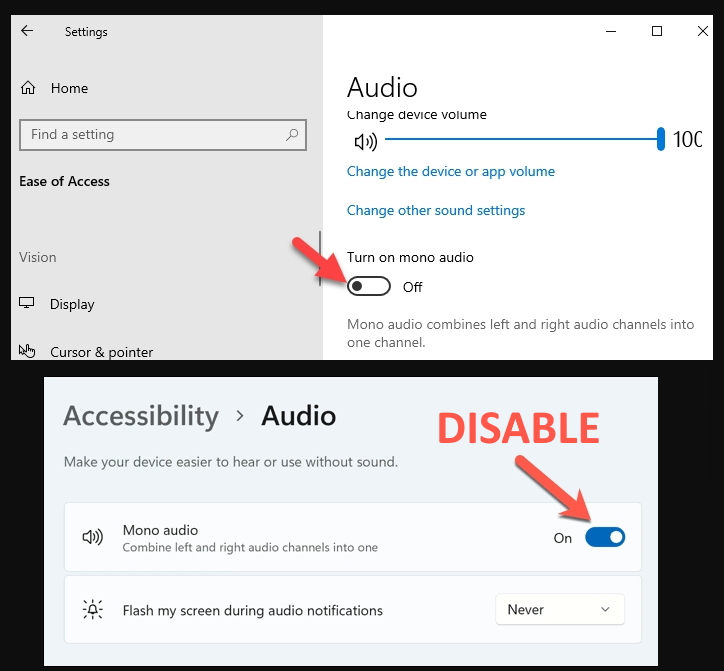
- Open Windows Settings → Accessibility → Audio.
- Turn off Mono Audio.
Mono Audio merges both stereo channels into one, causing sound to be heard in both ears even when only one channel is selected - which creates the bleed or echo effect.
→ Check if the issue is resolved. If yes - you're done ✓. If no - continue to Step 4.
Step 4: Restart Primus
Have you restarted Measureafter making the audio changes?
- ✅ Yes → Proceed to the escalation path below.
- ❌ No → Close Measure completely and relaunch it, then test speech stimulus playback again.
→ Check if the issue is resolved. If yes - you're done ✓. If no - proceed to the escalation path below.
🔺 Escalation path
If none of the above steps resolved the issue, contact Auditdata Support.
Please have ready:
- Windows version
- Measure software version
- Description of the audio issue (echo, bleed, continuous playback, double words)
- List of installed audio utilities
- Screenshots of audio settings
- Your account name and contact details
- Which steps above you already tried
✅ Expected outcome
After completing these steps, speech stimulus playback should be clear and distinct with no echo, proper channel separation, no unintended sound mixing, and correct stepped-mode behavior in Primus.
📝 Additional notes
- Third-party audio software (especially Waves MaxxAudio and similar enhancers) is the most common cause of this issue - always check for it first.
- Regular audio driver updates may also prevent compatibility issues with Measure audio output.
- Related articles: Deleting Waves Maxx Audio driver from Windows audio drivers · Audio Drivers Re-installation in Windows (Speaker Soft Sound Issue)
Need more help? Visit the Auditdata Help Centre or contact our support team.
© Auditdata - 2026