

Quick summary
A constant ticking sound at approximately 100 Hz is heard in the Monitoring Headset when navigating to the measurement page in Measure. The sound persists even when changing the headset or plugging and unplugging the Talk Back (TB) microphone. Resetting the Talk Back equalizer settings reduce the ticking. Note that a slight residual ticking may remain - a permanent fix is in development.
The steps below are a workaround, not a permanent fix. A permanent fix is currently in testing and will be included in a future software release.
⚙️ Before you begin
- Confirm the ticking is present specifically on the measurement page - not in general Windows audio output.
- Swapping the headset or toggling the TB microphone connection does not resolve this issue (it is not a hardware connectivity problem).
Step 1: Reset the Talk Back equalizer settings
- In Measure, open the Talk Over and Talk Back Settings menu.
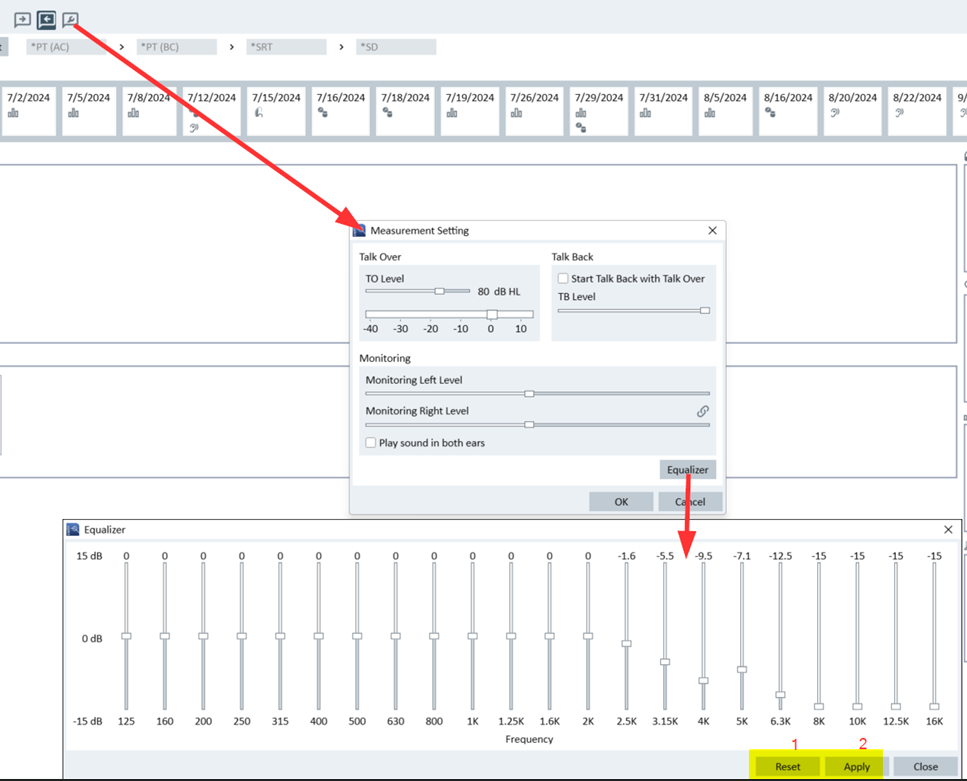
- Click Equalizer.
- Click Reset to restore the default equalizer settings, then click Apply.
- Close the Equalizer panel.
Step 2: Adjust the TB sensitivity slider
- In the Talk Back settings panel, adjust the TB sensitivity slider to reduce the ticking while keeping the patient's voice clearly audible.
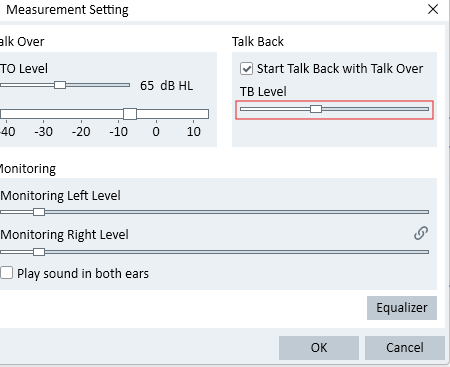
- Test on the measurement page and fine-tune as needed.
→ Check if the issue is reduced. A slight residual ticking may remain - this is expected until the permanent fix is released. If the ticking is unchanged or louder - proceed to the escalation path.
🔺 Escalation path
If resetting the equalizer does not reduce the ticking, contact Auditdata Support.
Please have ready:
- Measure software version
- Device model and serial number
- Your account name and contact details
- Which steps above you already tried
- Description of the ticking (frequency, when it occurs, whether it affects one or both ears)
✅ Expected outcome
After resetting the equalizer and adjusting the sensitivity slider, the ticking in the Monitoring Headset should be significantly reduced. A very slight residual ticking may still be present - this will be eliminated by the permanent fix in an upcoming software release.
📝 Additional notes
- This workaround may need to be repeated after reinstalling Measure (equalizer settings do not persist across reinstalls).
- A permanent fix is confirmed to be in development and will be included in the next software release.
- Related articles: Talk Back sound too low in Primus/Unity even if set to max level · Second channel can be heard when stimulus Speech (echo issue)
Need more help? Visit the Auditdata Help Centre or contact our support team.
© Auditdata - 2026