

Quick summary
Your W-REM probe may show an alternating or unstable battery level, fail to flash blue on power-on, or drop connection when outside the cradle. This guide walks you through a full charge cycle reset to restore normal operation.
⚙️ Before you begin
- Confirm you have access to the W-REM charging stand (with power supplied) or a USB-C adapter
- Confirm the latest Measure software and W-REM firmware are installed on your system
Step 1: Perform a full charge cycle reset
Is the W-REM probe connected to a power source with the power switch in the ON position?
- ✅ Yes: Skip to step 1.3 to wake the probe and begin charging.
- ❌ No: Work through the following steps:
- Check the power switch. Locate the switch on the side of the W-REM probe and confirm it is in the ON (upper) position. If it is in the lower position, slide it up.
📸 Insert screenshot: W-REM probe with power switch highlighted in the upper ON position 2. Connect the probe to a power source. Place the W-REM probe into the charging stand and confirm the stand is connected to a powered USB port or adapter. Alternatively, connect the probe directly using the USB-C adapter.
📸 Insert screenshot: W-REM probe seated in the charging stand, USB-C adapter shown alongside 3. Wake the probe to enable charging. Press the button on the front of the probe once. This wakes the probe from sleep and activates the charging circuit.
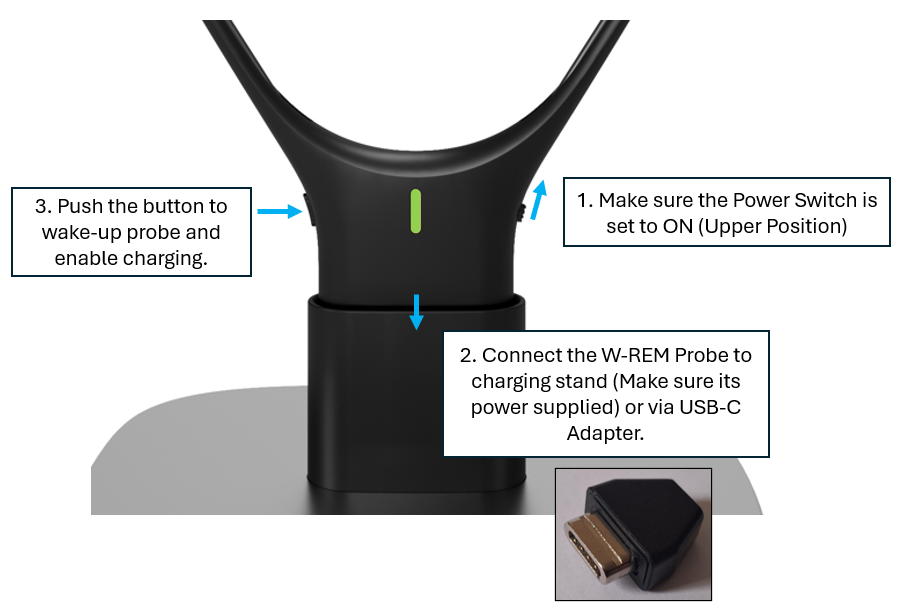
Leave the probe to charge for 3 hours. Once complete, Device Management will show 100% battery and the probe will operate normally.
⚠️ Special conditions
- If the battery display in Device Management alternates between 0% and 100% while the probe is in the cradle, this is expected during the charge cycle reset. Allow the full 3 hours before re-testing.
- If the probe does not flash blue on power-on, the battery may be critically depleted. Connect it to power first, wait 10–15 minutes, then press the wake button.
🔺 Escalation path
If the probe still does not charge or connect stably after a full 3-hour charge, contact Auditdata Support.
Please have ready:
- Product name and firmware version
- W-REM probe serial number
- Your account name and contact details
- Which steps above you already tried
- Screenshots of the battery level shown in Device Management
✅ Expected outcome
After a full 3-hour charge, Device Management shows 100% battery for the W-REM probe. The probe flashes blue on power-on, pairs reliably, and holds a stable connection outside the cradle.
📝 Additional notes
- Charge the W-REM probe regularly to avoid deep discharge, which can cause the unstable battery readings described in this article.
- Related articles: How to update W-REM firmware | Setting up the Wireless REM module in Measure | W-REM pairing and connection guide
Need more help? Visit the Auditdata Help Centre or contact our support team.
© Auditdata - 2026